
 CaseFy + lemlist integration
Replied in lemlist? It’s already in your pipeline.
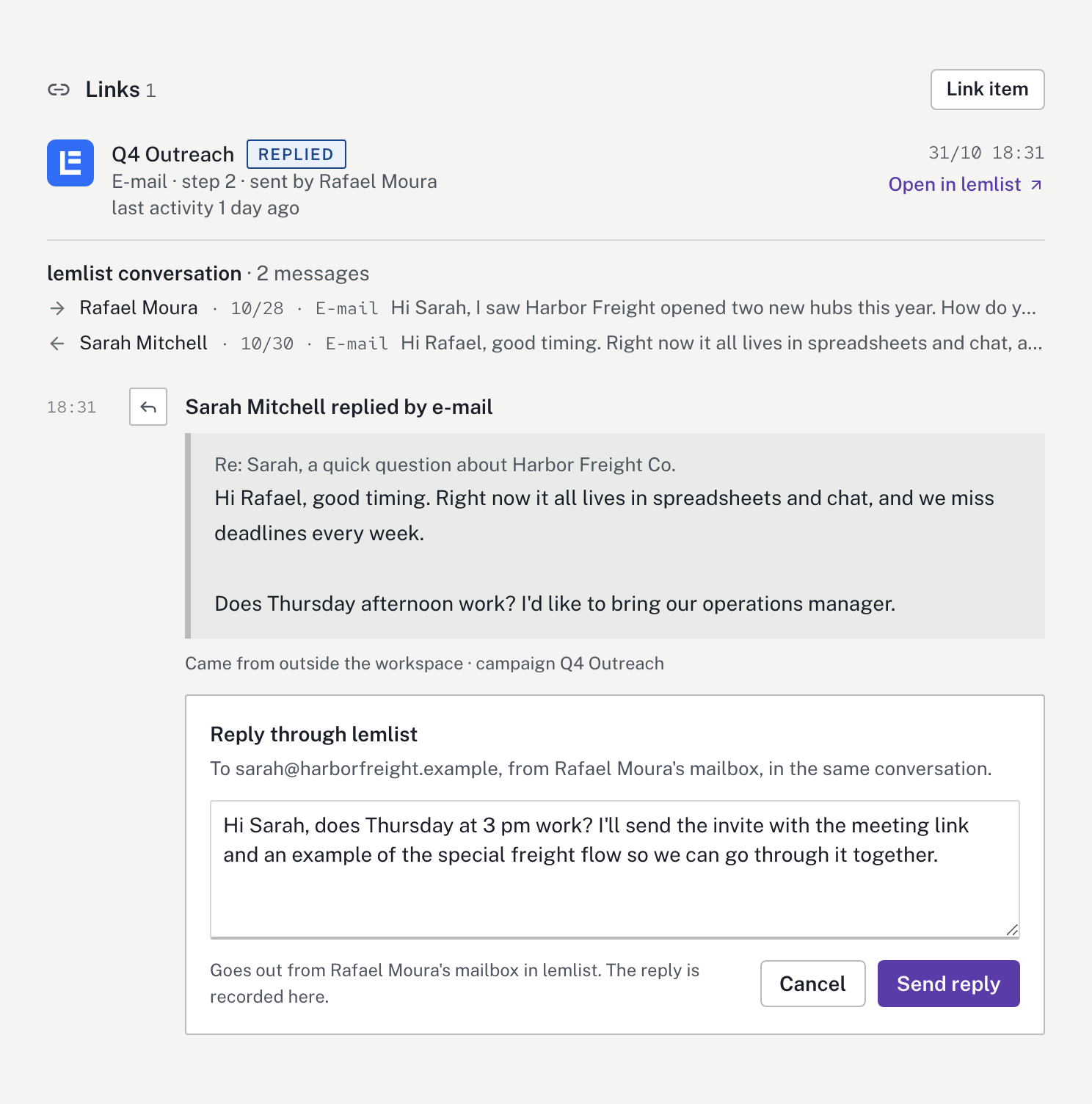
When someone replies to a campaign, CaseFy opens the item in your sales workflow with the person, the company and the whole conversation. Whoever sent the campaign picks it up from there, and the sequence stops by itself once the meeting is booked.
Uses the lemlist API, available from the Email Pro plan · Try CaseFy free for 14 days
How it works
Three steps. One minute.
- 01
Connect lemlist
Paste your API key. CaseFy finds your team and campaigns and subscribes itself to the notifications.
- 02
Choose what becomes an item
Replied, showed interest, accepted a LinkedIn invite: you pick the events, the campaigns and the workflow the item lands in.
- 03
Work the opportunity
The item arrives with the person, the company, the campaign and whoever talked to them. You can reply from CaseFy itself, in the same thread.
What happens on its own
Nobody copies leads from one tool to another.
One person, one item
If Anna replies to two campaigns, it’s still one item, with both campaigns on it. If she was a lost deal before, the new item links to the old one.
The right rep
The item goes to whoever sent the campaign. If they aren’t in CaseFy, it goes to the group you choose.
The sequence stops at the right time
Meeting booked or deal won? The person leaves your campaigns automatically. Nobody gets a “did you see my email?” after signing.
The whole conversation on the item
Email, LinkedIn, WhatsApp and SMS in order, without the quoted email repeated underneath. Anyone on the team gets the context in seconds.
Data becomes fields
Job title, phone, LinkedIn and your campaign variables (segment, pain point, headcount) fill in the item without anyone typing.
Unsubscribes respected
Asked to be removed on any channel? A rule unsubscribes the person in lemlist. GDPR stays on the right side, without relying on memory.
A workflow in one minute
Ask for the workflow. Start selling.
Tell the CaseFy assistant “I want a prospecting workflow with lemlist”. It builds the stages and rules below in a minute, and you adjust anything before you use it.
01Replied
The item starts here when the person replies or shows interest, already assigned to whoever sent the campaign.
02Qualification
You talk through the item itself. What the person wrote is right there, in order.
03Meeting
Once here, the person leaves your campaigns. No automatic follow-up after “let’s talk”.
04Won
lemlist marks the person as interested, so the reports in both tools match.
05Lost
The person goes back to a re-engagement campaign that waits as long as you decide.
Security
We keep the key. You keep the sending.
- Your API key is stored encrypted and only ever shown masked (••••17c1).
- lemlist notifications arrive with a secret only CaseFy knows.
- A lead’s reply is outside content: no agent sends anything because of it without a person approving.
- CaseFy never deletes a lead. Unsubscribing is always a rule you turn on.
AI agents
Your agents read lemlist too.
Give an agent the connection and it reads campaigns, leads and conversations to draft the next message or sum up the week’s objections. It can also build the whole workflow for you, with lemlist triggers and rules, from a conversation.
Questions
What people ask before connecting.
Which lemlist plan do I need?
The lemlist API is available from the Email Pro plan. In CaseFy, the integration is included in every plan, including the 14-day trial.
How long until the item shows up?
A few minutes: that’s how long lemlist takes to notice the reply in the mailbox.
Does it work with LinkedIn, WhatsApp and calls?
Events from every channel reach CaseFy. Replying from CaseFy works by email for now.
What if the person already has an open item?
The event goes into that item. It’s one item per person in each workflow, even if they reply to several campaigns.
What happens if I disconnect?
Your items and history stay in CaseFy. The notification CaseFy created in lemlist is removed.