
Every warranty claim gets an RMA number, a person and a date.
Customers send the serial and photos from their phone. Missing photos? One click asks for them. Out of warranty? The customer approves the repair cost from a link, and follows the claim on a tracking page instead of emailing you.
For customer service and repair teams at companies that sell equipment or devices, from 5 to 200 people.
Just you: $10/month · A team of 5: $50 · 14 days free · No credit card · Customers don't pay and don't need an account

One claim, start to finish
- 01
The customer emails returns@ (forwarded to your CaseFy address) or fills your claim form from their phone. Serial, purchase date and photos are required, so most claims arrive complete. CaseFy opens RMA-0418 and sends a receipt with a tracking link.
- 02
The Serial field looks up your product list and shows the model, the sale date and the warranty end date. A serial that isn't on the list shows no match, and the rep asks for the receipt.
Add a “warranty ends” column to your spreadsheet before importing: sale date plus the term.
- 03
The AI fills in the reason (won't charge, damaged in shipping, missing part) and the priority. Photos too dark? One click sends the customer an upload link, and the claim shows “Waiting on the customer”. No answer in 3 days? A reminder goes out and stops when they upload.
- 04
The rep approves the return and replies with the shipping instructions and your label. The AI drafts; the rep clicks Send. The customer's answer lands on the same claim.
- 05
The tech checks the unit in and moves it through Received, Diagnosing, Repairing and Shipped back, with repair notes and the parts used.
- 06
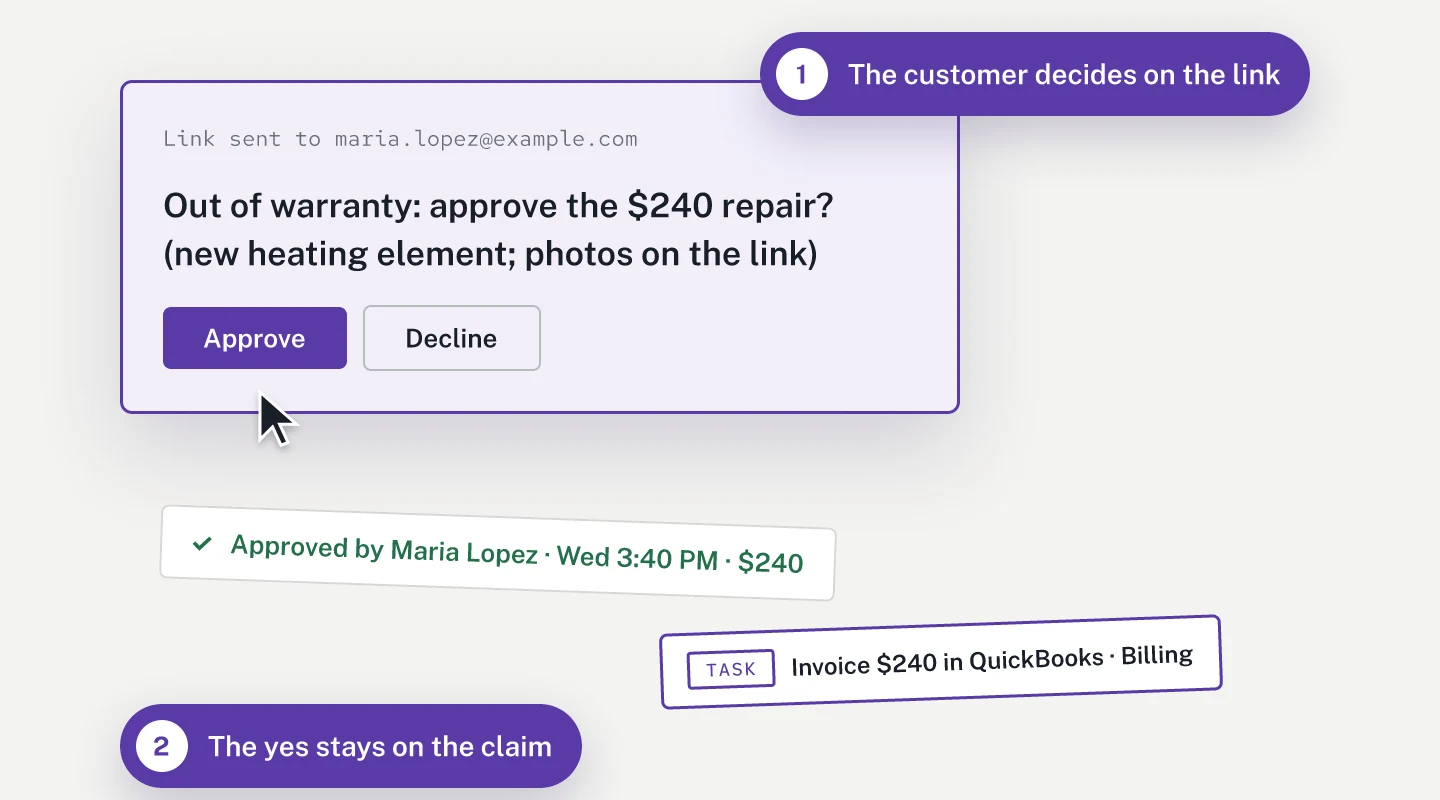
Out of warranty: the tech enters $240, and the customer gets one question on their link: approve the $240 repair? Approve or Decline, recorded with the time. On Approve, a rule creates the task “Invoice $240 in QuickBooks” for whoever invoices.
- 07
Credits over $500 stop until the operations lead approves in CaseFy or Microsoft Teams. You set the limits, up to 6 levels.
- 08
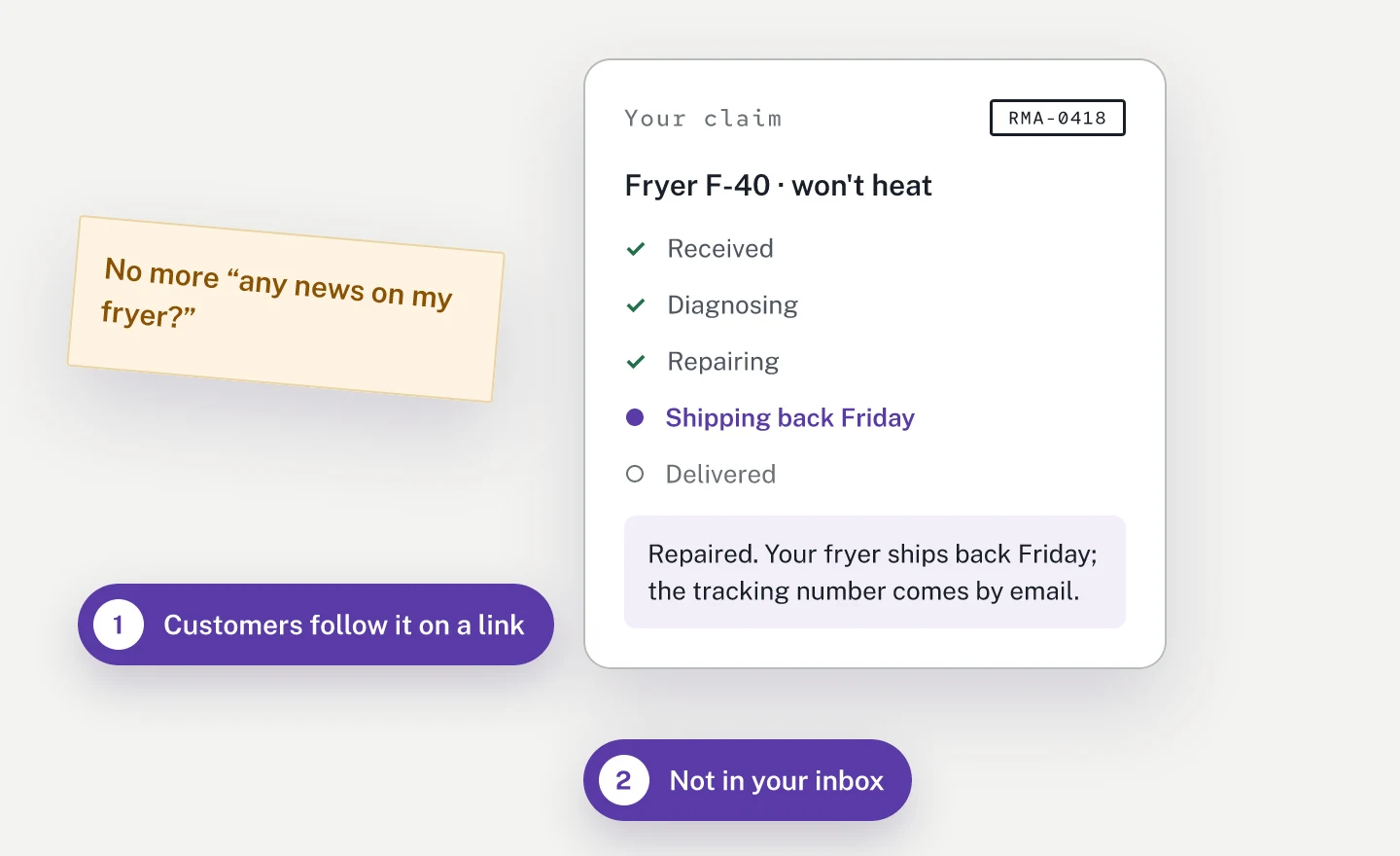
The customer sees “Shipping back Friday” on the tracking page. Closed.


Repaired on site, or claimed from the manufacturer
- Big units fixed at the customer's place? Use the steps Visit scheduled, On site, Fixed. The customer sees the visit date on their link, and a local service partner can get the job by email with a link to post the after photos.
- You're the distributor? Open a linked claim to the manufacturer from the customer's claim. Email them from it, their replies land there, and you track Claim filed and Credit received next to the customer's claim.
A record for disputes
Each claim keeps the photos, every email, the customer's Approve with the time, and who did what. Download its history as a spreadsheet with the date, time and person for each step.
Your Monday and your numbers
One list across all product lines: late, waiting on the customer, in repair, waiting on approval, by person. Numbers per product line: claims, average days to resolve and per step, on time and late. Claims by reason: filter the list by reason.

Keeping the product list current
Once a week, export the week's sales from QuickBooks or Shopify as a CSV (1 minute), add the “warranty ends” column with one spreadsheet formula, and import it (2 minutes). There's no live sync yet.
Languages
Each person on your team uses the app in English, Spanish or Portuguese. Customers get pages and emails in the language on their contact.
Set up in 15 minutes
- 1Import your product list: serial, model, sold on, warranty ends.
- 2Paste your claim reasons and steps, or start from Received · Diagnosing · Repairing · Shipped back. CaseFy drafts the form and the list.
- 3Forward returns@ and link the form from your support page. Open claims from your spreadsheet: create them from the list, about a minute each.
Price
$10per month for each person who logs in, AI included
Reps, techs, billing, and anyone who approves credits in CaseFy or Teams. Customers never pay. Example: 4 reps, 2 techs, billing and the ops lead are 8 seats, $80. An owner alone: $10. Monthly, cancel any time; 14 days free, no card.
Details
How the AI is counted
One AI task is the AI working on one claim once: reading it to fill the reason and priority, or drafting one reply. Each person brings 100 AI tasks a month, shared by the team: 8 people give 800 tasks, about 400 claims. At the limit the AI pauses until next month; claims, rules and deadlines keep running, and nothing is billed extra.
Emails to your customers
Replies go out as “Acme Support via CaseFy” with the claim number. When the customer answers, the email lands on the same claim.
Your data
Encrypted connections, encrypted daily backups stored off-site, and a history of every change. Photos and emails stay on the claim as files you can download. No SOC 2 certification yet. Security