
Every office problem gets someone on it and a date.
Coworkers report from their phone and follow it on a link instead of coming to your desk. Vendors get the job by email, and repairs over your limit wait for a yes.
For office managers at companies of 20 to 80 people with one office. Repairs, supplies, keys, a new monitor: one form for all of it.
Just you: $10/month · Live in about 10 minutes · 14 days free · No credit card · Coworkers, the landlord, vendors and approvers don't pay

One request, start to finish
- 01
A coworker scans the QR code on the kitchen wall or emails your requests address (CaseFy gives you one, or you forward your own). About 30 seconds, with a photo, no login.
Someone walks up to your desk? Log it for them in about 20 seconds; their receipt shows them the form for next time. Asked in a Teams chat? “…” › Share to Outlook › your address, about a minute.
- 02
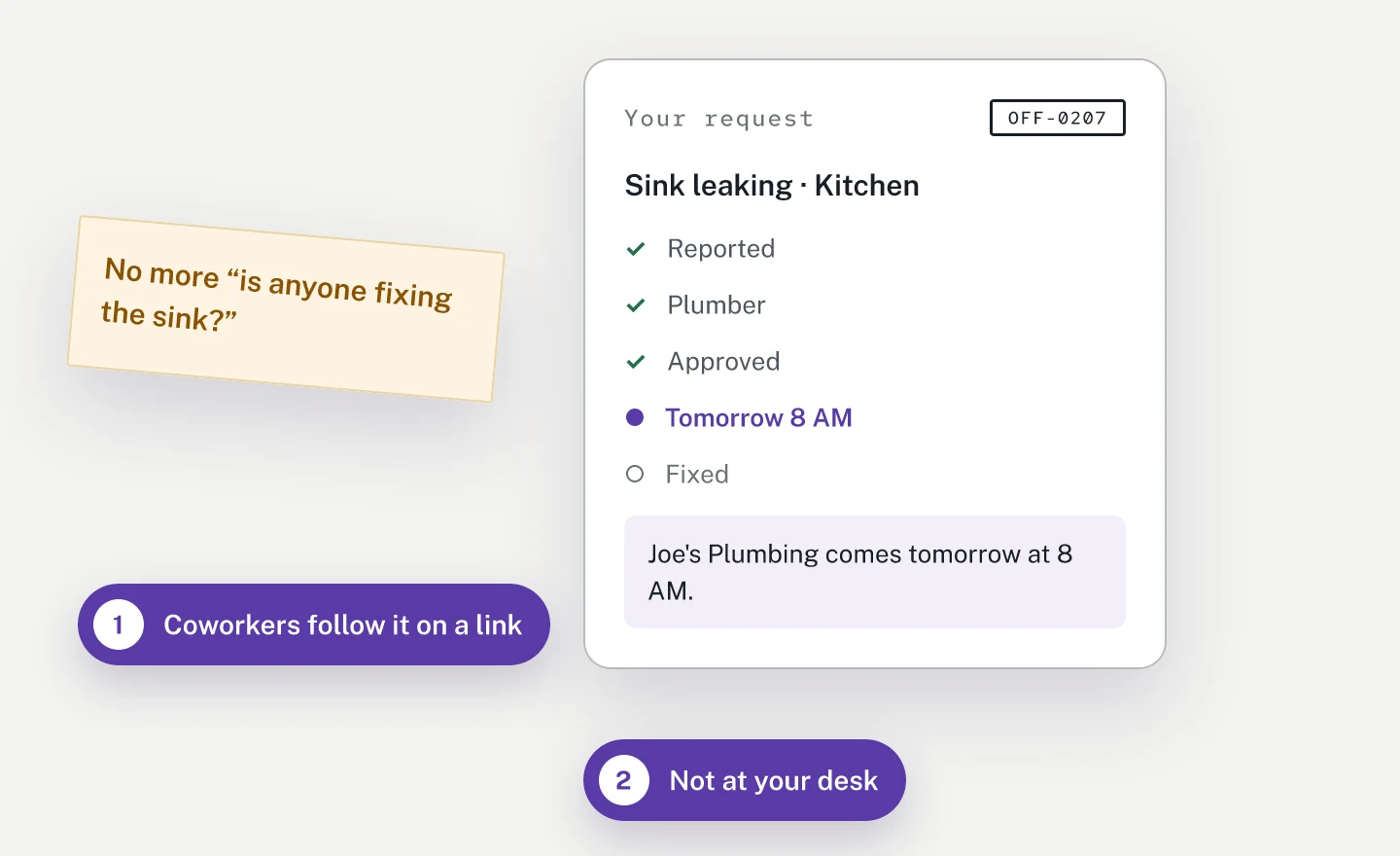
They get a receipt with a link to follow it, in English or Spanish. The link shows the steps and your messages. Your internal notes stay hidden.
- 03
The AI suggests the type and the priority, and you change either with one click. The job goes out on its own: plumbing to your plumber by email, electrical to your handyman, the rest to you.
Want to check the AI's type first? Turn on “confirm before sending”.
- 04
The plumber gets an email with a link to send the quote and photos. No account. Plumber called you instead? Type the quote on the request yourself.
- 05
No quote after 1 business day (1 hour for Urgent), or the job runs past its deadline? The vendor or the landlord gets a reminder, and you get a warning.
- 06
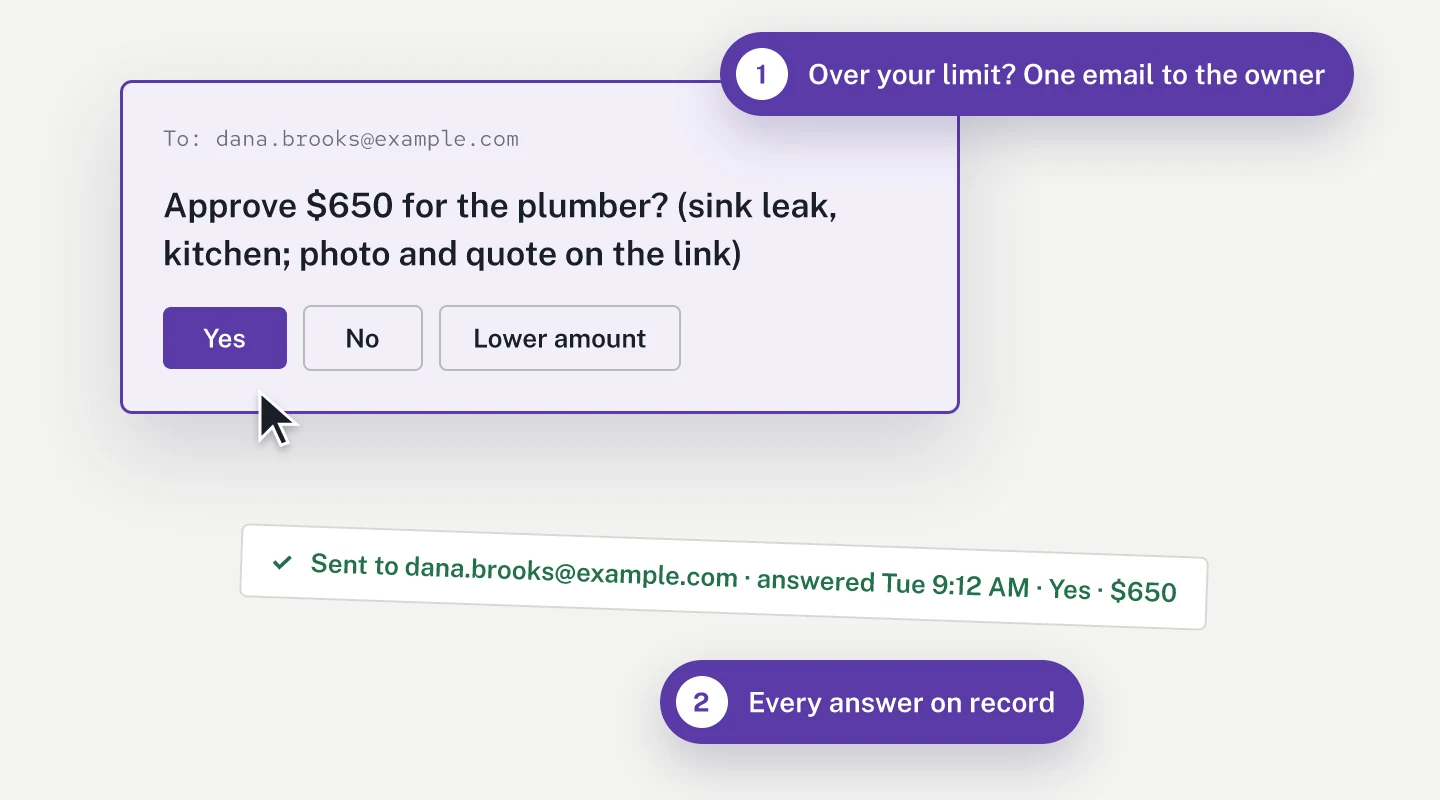
The quote is $650, over your $500 limit, so the owner or COO gets one question by email: approve $650 for the plumber? Yes, No or a lower amount, from the phone, no account. No limit set? Nothing waits for a yes.
- 07
On Yes, the plumber gets “Go ahead, pick a time” by email. They write “Tomorrow 8 AM” on the link, and the coworker sees it on theirs.
- 08
The plumber presses Done and adds the after photo, and the coworker gets an email. Still leaking? They say so in the chat on their link, and you reopen it with one click.


Late? You get a warning when half the time is gone and again when the deadline passes.
For the owner or COO
You approve repairs over the limit from an email in your language. It's free, and every answer stays on record with your name, the time and the amount. Details at the bottom of the page.
Who does the work
- Supplies, keys, a new monitor: same form. They come to you, or IT requests go straight to your IT contractor by email. A purchase over your limit goes through the same yes.
- Your handyman: free, one email per job with a link to post photos and press Done. Or a $10 seat, and he sees his own list.
- Your landlord: gets the job by email and presses Done, or replies “Fixed” or “next Tuesday”. No amount, no approval.
Your list and your numbers
One list: new, late (in red, with whose it is), waiting on a vendor or the landlord, waiting on a yes, checks due this week. Filter by vendor to see who is late. Numbers by type: average days to fix, on time and late. Export the list as a CSV spreadsheet any time.

Checks that don't get forgotten
Fire extinguishers every month, HVAC filters four times a year, the fire alarm test every year. Each one opens on its own with a due date, for you or straight to the vendor by email with a reminder, and a link to mark it done with a photo.
Five people, same broken printer
CaseFy flags reports that look alike (“Is this the same printer?”) and one click merges them into the first. The other four see theirs closed as a duplicate. They don't get the “fixed” email yet.
Set up in 10 minutes
Describe your office in a paragraph (“one floor, a kitchen, the landlord fixes the building, Cool Air does HVAC, Joe's Plumbing does plumbing”). CaseFy drafts the problem types, who gets each, deadlines, monthly checks and the form, and you change anything. Add vendors and your bookkeeper as “name, email”, set a limit and an approver if you want one. Requests sitting in your inbox? Forward them to your requests address.
Then send this to everyone
“From today, report office problems here: [form link]. You'll get a link to follow it.” Put a QR code of the link on the kitchen and printer walls; any free QR generator makes one in a minute.
Price
$10per month for each person who logs in
Just you: $10. Coworkers, the landlord, vendors, your handyman and approvers work from email links and pay nothing. AI included, enough for about 50 requests a month per seat; past that, only the suggestions pause. Someone covers your vacation? Give them a seat that month and move your open requests to them in one click. Monthly, cancel any time.
Details
For the owner or COO
Each approval comes by email in your language: Yes, No or a lower amount, recorded with the time and the email the link went to (“Sent to dana.brooks@example.com · answered Tue 9:12 AM · Yes · $650”). The record doesn't name who clicked. The approval link has no extra code: whoever has the email can answer, so don't forward it. Want a sign-in check? Take a $10 seat and approve inside CaseFy instead. No answer: a reminder, then your backup approver when the request's deadline passes. Above an amount you set, the CEO is asked after you. Each closed repair can email you the final amount. A $10 seat shows the list and the numbers any time.
Final amounts and your bookkeeper
The vendor enters the final amount with Done. Above the approved one? You see both and send the owner the question again with one click. Each closed repair emails your bookkeeper the final amount, the vendor and the quote; she types it into QuickBooks (no QuickBooks connection).
Deadlines
Urgent 4 business hours, High 1 business day, Normal 3, Low 5, all editable. They count your office hours and holidays in your time zone, or every hour if you choose. Urgent alerts go out right away by email, in the app and in Microsoft Teams.
Friday-night leak
To cover nights and weekends, count every hour and give High 2 days, Normal 5 and Low 7. A leak reported at 6 PM Friday is due at 10 PM Friday; a lightbulb reported Friday is due next Friday.
Microsoft Teams (optional)
Email works without it. Alerts and approvals in Teams need a one-time OK in the Microsoft 365 admin center, about 2 minutes. A request asked in a Teams chat goes through “…” › Share to Outlook › your requests address. Your own address: forward facilities@yourcompany to your CaseFy address.
Who sets what
The office manager, as admin, sets types, deadlines, the limit and the approvers. Changes to settings aren't logged yet. If the owner wants to be the only one who can change her limit, she takes the only admin seat ($10) and the office manager works as a member: assigns, replies, sends jobs, closes.
Your data
Encrypted connections, encrypted daily backups stored off-site, and a history of every change on each request (who, what, when). No SOC 2 certification yet. After the trial your requests stay, read-only, until you subscribe.